

SOCKS5 UDP Proxy (UDP ASSOCIATE) on Mobile IPs
Most traffic is TCP, but calls, games, WebRTC, QUIC and DNS use UDP. The XProxy SOCKS5 port carries both: a SOCKS5 client asks for UDP with UDP ASSOCIATE, and the datagrams leave through the same modem and the same mobile IP.
You need: any plan, a modem online and a client that speaks SOCKS5 UDP. Through a VPS you also need VPS Forwarding (Premium).
In short
Every SOCKS5 port answers UDP ASSOCIATE. Nothing to switch on in your LAN.
UDP leaves through the modem of that port, like the TCP traffic.
Most browsers send only TCP to a proxy, and HTTP proxies carry no UDP. Use an app that asks for it, or a VPN.
Which apps send UDP through SOCKS5?
| Client | UDP through SOCKS5 | Use instead |
|---|---|---|
| Chrome, Edge and most antidetect browsers (AdsPower, GoLogin, Multilogin) | No. They send TCP only and switch QUIC off behind a proxy. A few antidetect browsers add UDP over SOCKS5 for WebRTC: the XProxy SOCKS5 port answers it. | Fine for browsing. For WebRTC see WebRTC leak protection. |
| HTTP proxy (CONNECT) | No, HTTP proxies carry TCP only. | The SOCKS5 port, or Shadowsocks. |
| Proxifier, v2rayN, sing-box, Clash | Yes, when the app's UDP option is on. | — |
| Your own scripts (Python, Go, Node) | Yes, with a SOCKS5 library that supports UDP, or the test script below. | — |
| Phones, games, calls | Apps rarely offer it. | Shadowsocks, VLESS or WireGuard: they route the whole device. |
Which port to use
Use the SOCKS5 port of the modem, with the same login as for TCP. With Auto Proxy on (the default), HTTP and SOCKS5 share one port: modem #1 is 4001. With Auto Proxy off, SOCKS5 is on its own port: 5001. The HTTP & SOCKS5 guide shows where to find them.
Test UDP in one minute
This script sends one STUN request (the same kind WebRTC uses) through the proxy. The STUN server answers with the address it saw: it must be the modem's mobile IP.
#!/usr/bin/env python3
"""Check that a SOCKS5 proxy carries UDP (UDP ASSOCIATE).
Sends one STUN request through the proxy and prints the IP the STUN server saw.
Usage: python3 socks5_udp_test.py HOST PORT [USER PASS]"""
import os, socket, struct, sys

STUN_HOST, STUN_PORT = "stun.l.google.com", 19302

def associate(host, port, user=None, password=None):
    ctl = socket.create_connection((host, port), timeout=8)
    ctl.sendall(b"\x05\x01" + (b"\x02" if user else b"\x00"))
    try:
        _, method = ctl.recv(2)
    except (socket.timeout, ValueError):
        sys.exit("No SOCKS5 answer: this is not a SOCKS5 port.")
    if method == 0x02:
        u, p = user.encode(), password.encode()
        ctl.sendall(b"\x01" + bytes([len(u)]) + u + bytes([len(p)]) + p)
        if ctl.recv(2)[1] != 0:
            sys.exit("Login refused: check the username and password.")
    ctl.sendall(b"\x05\x03\x00\x01" + socket.inet_aton("0.0.0.0") + b"\x00\x00")
    rep = ctl.recv(10)
    if len(rep) < 10 or rep[1] != 0:
        sys.exit("UDP ASSOCIATE refused: this port does not carry UDP.")
    ip = socket.inet_ntoa(rep[4:8])
    return ctl, (host if ip == "0.0.0.0" else ip, struct.unpack("!H", rep[8:10])[0])

def main():
    host, port = sys.argv[1], int(sys.argv[2])
    ctl, relay = associate(host, port, *sys.argv[3:5])
    print(f"UDP ASSOCIATE accepted, relay {relay[0]}:{relay[1]}")
    tid = os.urandom(12)
    stun = struct.pack("!HHI", 1, 0, 0x2112A442) + tid
    name = STUN_HOST.encode()
    head = b"\x00\x00\x00\x03" + bytes([len(name)]) + name + struct.pack("!H", STUN_PORT)
    udp = socket.socket(socket.AF_INET, socket.SOCK_DGRAM)
    udp.settimeout(5)
    udp.sendto(head + stun, relay)
    data = udp.recvfrom(2048)[0]
    msg = data[10:] if data[3] == 1 else data[7 + data[4]:]
    pos = 20
    while pos + 4 <= len(msg):
        kind, size = struct.unpack("!HH", msg[pos:pos + 4])
        if kind == 0x20:  # XOR-MAPPED-ADDRESS
            val = msg[pos + 4:pos + 4 + size]
            ip = bytes(b ^ m for b, m in zip(val[4:8], b"\x21\x12\xa4\x42"))
            print("STUN server saw:", socket.inet_ntoa(ip))
            print("UDP works through this proxy.")
            return
        pos += 4 + size + (-size % 4)
    sys.exit("Got a reply, but no address in it.")

main()
Run it with the address, port and login of your proxy:
$ python3 socks5_udp_test.py 192.168.1.10 4001 demo proxy123
UDP ASSOCIATE accepted, relay 192.168.1.10:51373
STUN server saw: 172.58.xx.xx
UDP works through this proxy.- "UDP ASSOCIATE refused": the port is an HTTP-only port, or a client-side firewall blocks UDP.
- Timeout after "accepted": UDP to the box is blocked on the way. The relay is a new random UDP port (51373 above), not the proxy port, so a firewall in front of the box must let UDP through. On the same LAN that is rare; through the internet see UDP through a VPS.
- Your own IP in the answer: the script did not use the proxy. Check the host and port.
UDP through a VPS
With VPS Forwarding, the VPS passes TCP by default and UDP ASSOCIATE gets no answer. To carry UDP from anywhere:
- In General Settings → Forwarding Ports, use the Relay tunnel engine (WireGuard does not offer this option).
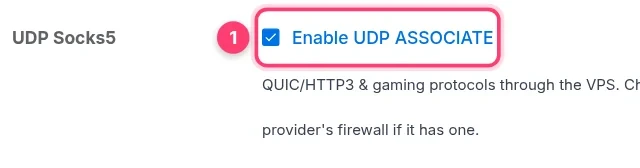
- Tick UDP Socks5 → Enable UDP ASSOCIATE 1, then Check & apply.
- Allow UDP ports
32768–60999in your VPS provider's firewall too. XProxy opens them in the VPS's own firewall (ufw or firewalld) for you.
UDP through the VPS works on the main proxy port of each modem. The separate SOCKS5 port and the IPv6 ports pass TCP only through the VPS.
Other ways to carry UDP
| Protocol | UDP | Good for |
|---|---|---|
| Shadowsocks | Yes, on the same port as TCP | Apps and phones that import an ss:// link |
| WireGuard / OpenVPN | Yes, all traffic of the device | Games, calls, apps without proxy settings |
| VLESS | Through apps that support it | Phones and strict networks |
FAQ
Does UDP count toward a port's data quota?
Yes. On Selling Platform ports, UDP datagrams are counted, and they stop with the TCP traffic when the quota is used up.
Does a proxy group port carry UDP?
Yes. A proxy group port answers UDP ASSOCIATE too and sends UDP out through one of its modems.
Then why does my browser not use QUIC through the proxy?
Because the browser decides that, not the proxy. See QUIC & HTTP/3 through a proxy.
What next?
See what happens to QUIC and HTTP/3 on each protocol.