

IP Pools, Rotation Log & Uptime Stats for Mobile Proxies
See every IP your mobile proxies got, how many were unique, how often an IP came back, and how long each proxy stayed online. The IP Pools window, the IP Rotation Log and Uptime Statistics in Proxy Management answer these questions.
You need: the Basic plan or higher for the IP history and rotation stats (Pricing).
In short
One list of every IP of all your modems, with a score, how often it came back and which modems used it.
Every rotation of one modem: the new IP, success or duplicate, how long it took and who started it.
When one modem was live or down, in ten-minute steps, plus every stop and resume.
How do I see all the IPs my mobile proxies used?
Step 1 of 2
In Proxy Management, click IP Pools in the toolbar (on a phone: More → IP Pools). The window IP Pools Analytics opens.
- The four cards 1 sum up every IP your modems got: Unique IPs, Total Rotations, Fresh Rate and Avg Uses/IP.
- Type an IP in the search box 2 and press Enter to find it.
- Guard Settings 3 opens the Smart IP Guard tab of Rotation Settings.
- The table 4 shows one line per IP with its Score, Repeats and Freshness. Click a column title to sort.
The IP Pools window lists every IP stored in your rotation history, newest first, for all modems together.
What do unique IPs, fresh rate and repeats mean?
| Name | Where | Meaning |
|---|---|---|
| Unique IPs | IP Pools, Rotation Log | How many different IP addresses were recorded. In IP Pools it counts all modems and every stored day. In the Rotation Log it counts one modem in the dates you picked. |
| Total Rotations | IP Pools | How many times IPs were recorded in all. One IP that came back three times counts three. |
| Avg Uses/IP | IP Pools | Total Rotations divided by Unique IPs. A number near 1 means almost every IP was new. |
| Repeats | IP Pools | How many times an IP came back after its first appearance. 0× means it was never seen again. |
| Score | IP Pools, IP Quality column | 100 for an IP seen once. It drops by 1 for each repeat, down to 0. IP Pools counts every stored rotation. The Rotation Log and the IP Quality column count only your Smart IP Guard time window. |
| Freshness | IP Pools, Rotation Log | Fresh when the score is at or above your Fresh Score, Warning below it, Stale when Smart IP Guard gave up. See Smart IP Guard. |
| Fresh Rate | IP Pools | The share of Fresh IPs among the lines shown on the current page. |
| Modems Used | IP Pools | How many positions have had that IP. |
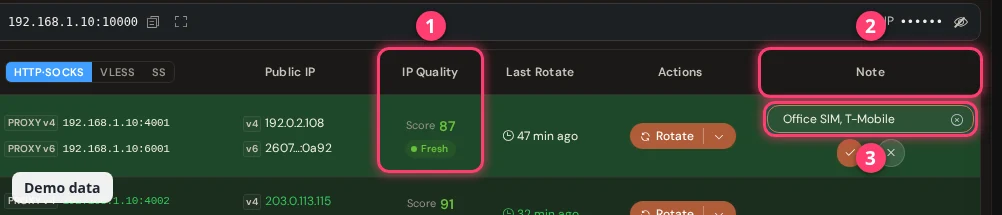
Want the quality of the IP a modem has now? Tick IP Quality in the Columns menu of Proxy Management. It shows the score and Fresh, Warning or Stale next to each IP, and needs Smart IP Guard to be on.
How do I see the rotation history of one modem?
Use IP Rotation Log in the row menu. It lists every rotation of that modem in the dates you pick, and its Analysis Data tab counts the unique IPs.
Step 1 of 3
In Proxy Management, click the small arrow next to Rotate on the modem you want. Choose IP Rotation Log or Uptime Statistics 3.
How do I check the uptime of a mobile proxy?
Use Uptime Statistics in the row menu. It shows when the modem was live or down, and when it was stopped or resumed.
Step 1 of 3
The window Uptime Statistics opens on Uptime Overview. Pick a date range 1 (today by default) and click Query.
Each day is a card 2 with one tile per 10 minutes. A tile is LIVE when the box saw at least one successful check in those 10 minutes. It is DIE when it saw none, and NO DATA when nothing was recorded. The legend 3 shows the colors.
How long is the history kept?
The IP rotation history and the uptime logs are kept for 60 days by default. To change it, open Proxy Management → Proxy Settings → General → Proxy Logging Setting. IP Rotation History and Uptime Logs each take 7 to 365 days. The uptime change applies after the next restart. Smart IP Guard cannot look further back than the IP history. See Proxy Settings.
Questions
How many unique IPs does my mobile proxy get?
Open IP Rotation Log for the modem, choose your dates, then Analysis Data. Unique IPs is the count. For all modems together, open IP Pools. The carrier decides how many different IPs a SIM can get.
Why do I get the same IP again?
Carriers reuse addresses from a pool. Turn on Rotate if same IP, Make IP Unique or Smart IP Guard in Rotation Settings so the box rotates again when an IP repeats.
How do I know who rotated an IP?
The By column in the Rotation Log and Triggered By in IP Pools show it: Web UI, API, Scheduled, Manual, System, Auto Guard, Dup IP, Reboot or Carrier.
Why does a modem show DIE in the uptime overview?
The box found no successful check in that 10-minute step. The modem was offline, or it was stopped. Open Stop History to see whether someone or Smart IP Guard stopped it.
What next?
Tune how modems get their IPs, and rotate on demand.