
How Mobile Proxy IPs Work
Understand backconnect proxy mechanics, exit IPs, and why mobile proxies differ from residential/datacenter.
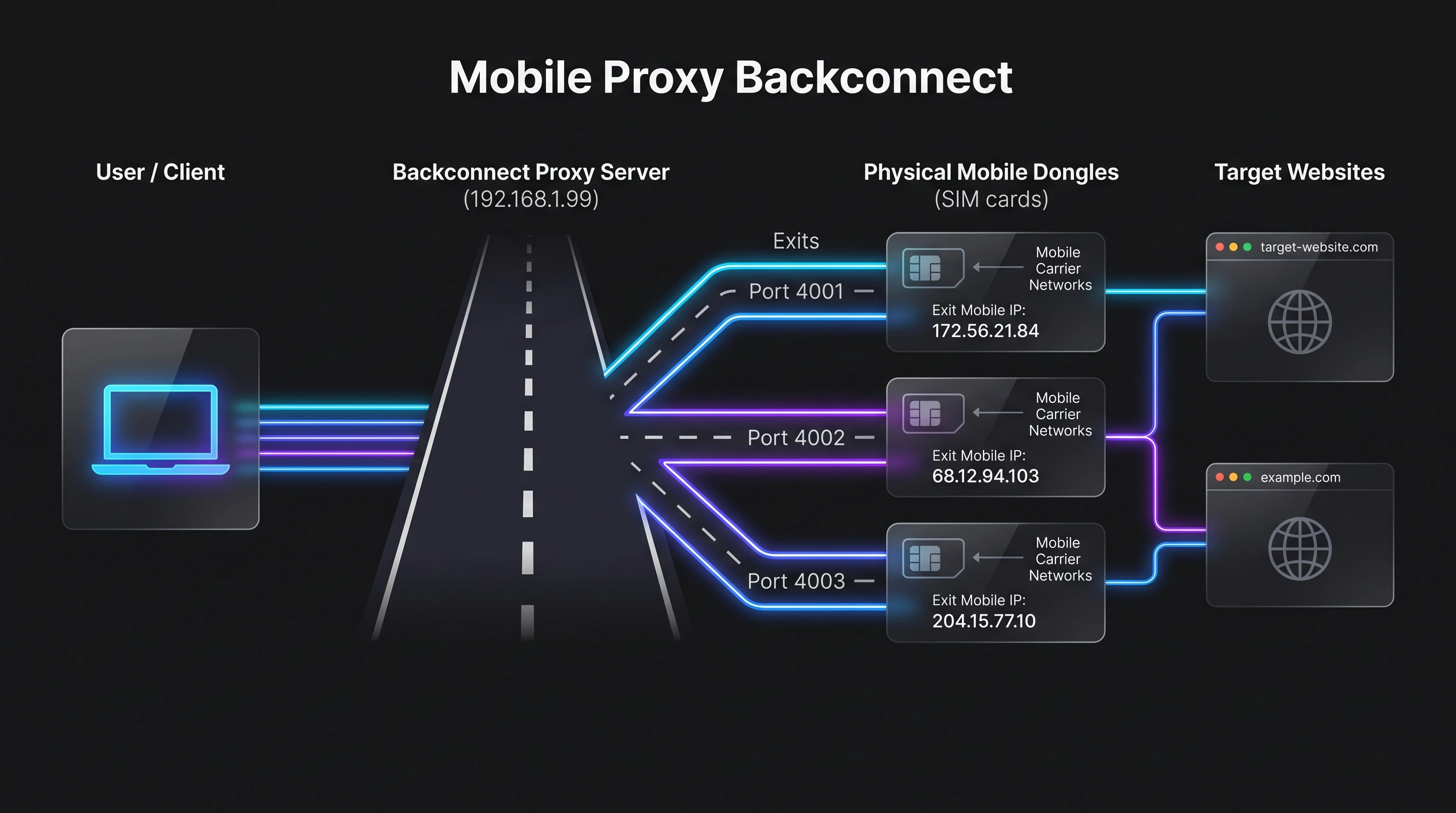
Road vs. House Analogy
Think of traveling from New York to Chicago:
- The road/highway is the backconnect proxy server.
- The city exit is the mobile dongle.
- target-website.com is the destination website.
Every traveler may use the same highway (backconnect IP), but they leave the highway through different city exits (ports/dongles). The target website does not know which highway you used to get there; it only sees which exit (mobile IP) you arrived from.
For example, if 192.168.1.99 is the highway (backconnect server), each proxy port is a different exit leading to a different mobile dongle. The target website only sees the mobile IP, not the highway (the backconnect server).
So it is completely normal for all proxy ports to share the same backconnect server IP while presenting different mobile IPs to websites.
Residential/Datacenter vs. Mobile Proxy
With Residential or Datacenter proxies, each proxy is like a different house with its own address. Since the IP address is fixed to that house, every proxy port must have a different public IP. If you want another IP, you need another house (another proxy).
A Mobile Proxy works differently. Here, the backconnect server is the road, not the house. Every connection travels on the same road, but each proxy port leads to a different mobile device (dongle).
The mobile carrier can change the destination address (mobile IP) at any time while the road stays exactly the same. This is the biggest advantage of mobile proxies. You always connect through the same gateway, but the exit IP can change naturally without changing the proxy server or your proxy settings.
| Feature | Residential / Datacenter Proxy | Mobile Proxy |
|---|---|---|
| Analogy | A fixed house with its own address. | A highway leading to various mobile exits. |
| IP Binding | Each proxy port must have a different public IP. If you want a new IP, you need another house (another proxy). | All proxy ports share the exact same backconnect IP, but route to different exit mobile dongles. |
| IP Rotation | Fixed IP. Cannot change. | Dynamic exit IP. Carrier rotates the IP naturally at any time without changing your proxy settings. |
| Trust Level | Lower (often flagged as bots). | Highest (trusted mobile carrier networks). |
Why are Mobile Proxies more expensive?
A datacenter proxy is just a virtual server in a data center. Providers can create thousands of IPs on a single server at a very low cost, which is why they can sell proxies for $1–5/month.
A mobile proxy requires real physical hardware:
- A real 4G/5G modem (dongle)
- A real SIM card
- A real mobile data plan
- USB hubs, power supply, and maintenance
- A backconnect server to route traffic
Each dongle can only serve a limited number of users, and every SIM has an ongoing monthly cost.
The biggest advantage is that the gateway (backconnect server) stays the same, while the mobile carrier can change the exit IP naturally. Target websites only see the real mobile IP, which is much more trusted than a datacenter IP.
In simple terms: Datacenter proxy is cheap because it's just software and virtual IPs. Residential proxy is more expensive because it relies on residential internet connections. Mobile proxy is the most expensive because it requires real mobile devices, real SIM cards, and real carrier networks. That's why high-quality mobile proxies often cost $100/month or more.
