

QUIC & HTTP/3 Through a Proxy: What Really Happens
QUIC is the fast, UDP-based transport behind HTTP/3. Google, YouTube, Facebook and Cloudflare sites use it. Behind an HTTP or SOCKS5 proxy, browsers quietly fall back to HTTP/2 over TCP. Here is what really happens, and how to keep QUIC on your mobile IP when you need it.
You need: nothing for HTTP/2, which works on every port. To keep QUIC: Shadowsocks (Premium) or WireGuard (Basic).
In short
HTTP/3 runs over UDP port 443. A path that only carries TCP cannot use it.
With a proxy set, Chrome uses HTTP/2 over TCP. Pages still load normally.
WireGuard, or a Shadowsocks app in VPN mode, carries UDP, so HTTP/3 stays on.
What we measured
The same Chrome 148 opened cloudflare-quic.com three times in each setup. The page says which protocol the browser used:
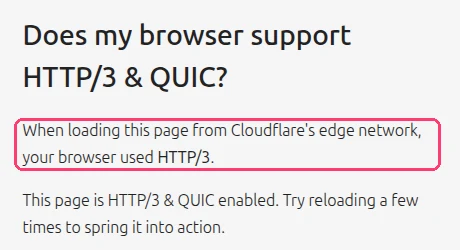
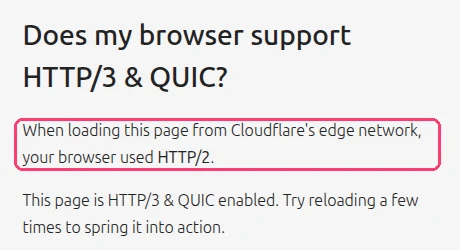
| Chrome setup | Protocol (3 loads) |
|---|---|
| No proxy | HTTP/3, HTTP/3, HTTP/3 |
| SOCKS5 proxy | HTTP/2, HTTP/2, HTTP/2 |
| HTTP proxy | HTTP/2, HTTP/2, HTTP/2 |
Real captures from a lab test on 17 November 2026 (Chrome 148, Linux). The protocol is the browser's nextHopProtocol for the page. The SOCKS5 proxy in this test answers UDP ASSOCIATE, like the XProxy SOCKS5 port, and Chrome still chose HTTP/2: the fallback comes from the browser, not from the proxy.
Which XProxy protocol keeps QUIC
| How you connect | QUIC / HTTP/3 | Why |
|---|---|---|
| HTTP or SOCKS5 in a browser | No, HTTP/2 instead | The browser sends TCP only to a proxy. |
| SOCKS5 with UDP ASSOCIATE in an app | If the app sends it | The port carries UDP; the app has to use it. |
| WireGuard / OpenVPN | Yes | The whole device is on the modem, UDP included. |
| Shadowsocks app in VPN (TUN) mode | Yes | The app captures all traffic and sends UDP through the tunnel. |
| VLESS app in VPN (TUN) mode | Usually no, HTTP/2 instead | XProxy VLESS uses the xtls-rprx-vision flow. Xray-based apps (v2rayN, v2rayNG) block QUIC on that flow by default, so the browser falls back to HTTP/2. |
| Any of them through VPS Forwarding | Needs UDP on the VPS | Turn on Enable UDP ASSOCIATE (Relay) or use the WireGuard engine. |
Does HTTP/2 instead of HTTP/3 give me away?
Rarely. Many office, school and public Wi-Fi networks block UDP, so websites see HTTP/2 from real users every day. What matters more is that the rest of the visit tells one story: the TCP/OS fingerprint, WebRTC and DNS.
Keep QUIC when an app needs it: video calls, games, apps that only work over HTTP/3, or when you want the phone-like traffic of a real mobile user. Use a VPN for that.
Check it yourself
- Connect the way you want to test (browser with the proxy, or the VPN on).
- Open cloudflare-quic.com and reload once.
- Read "your browser used HTTP/…". In Chrome DevTools you can also open Network, right-click the column header and add Protocol:
h3is HTTP/3,h2is HTTP/2.
FAQ
Can XProxy force or block QUIC?
No, there is no such switch. The browser or app chooses. If you want to stop QUIC on purpose, turn it off in the browser (in Chrome: chrome://flags → Experimental QUIC protocol).
Does TCP OS Spoofing change QUIC traffic?
No. TCP OS Spoofing rewrites how TCP connections start. QUIC is UDP, so it is not touched.
What next?
Next, keep the carrier from seeing your proxy as a hotspot.