

Shadowsocks Proxy Setup
Shadowsocks is a light, encrypted proxy that almost every proxy app understands. Turn it on once, copy one ss:// link per modem, and paste it into the app.
You need: a Premium or Business plan (on other plans the Shadowsocks switch is locked) and at least one modem online.
In short
Traffic between the app and your box is encrypted, so the Wi-Fi or network in between cannot read it.
One port carries both, so calls, games and QUIC work too.
v2rayNG, V2Box, v2rayN, Shadowrocket and many routers import ss:// links.
Set it up
Step 1 of 3
Open Proxy Management → Proxy Settings → General.
- Switch on Shadowsocks 1.
- Leave the Cipher 2 on
aes-256-gcmunless your app needs another one.chacha20-ietf-poly1305is faster on old phones. - Click Save & restart 3. The proxies restart for a few seconds and the Shadowsocks ports open.
user. Change the password and every link changes with it.Connect your device
Any app that imports ss:// links works. Pick your platform:
- Install v2rayNG (free) from Google Play, or the
arm64-v8aAPK from GitHub. - Send the
ss://link to the phone and copy it there. In v2rayNG tap + at the top, then Import from Clipboard 1.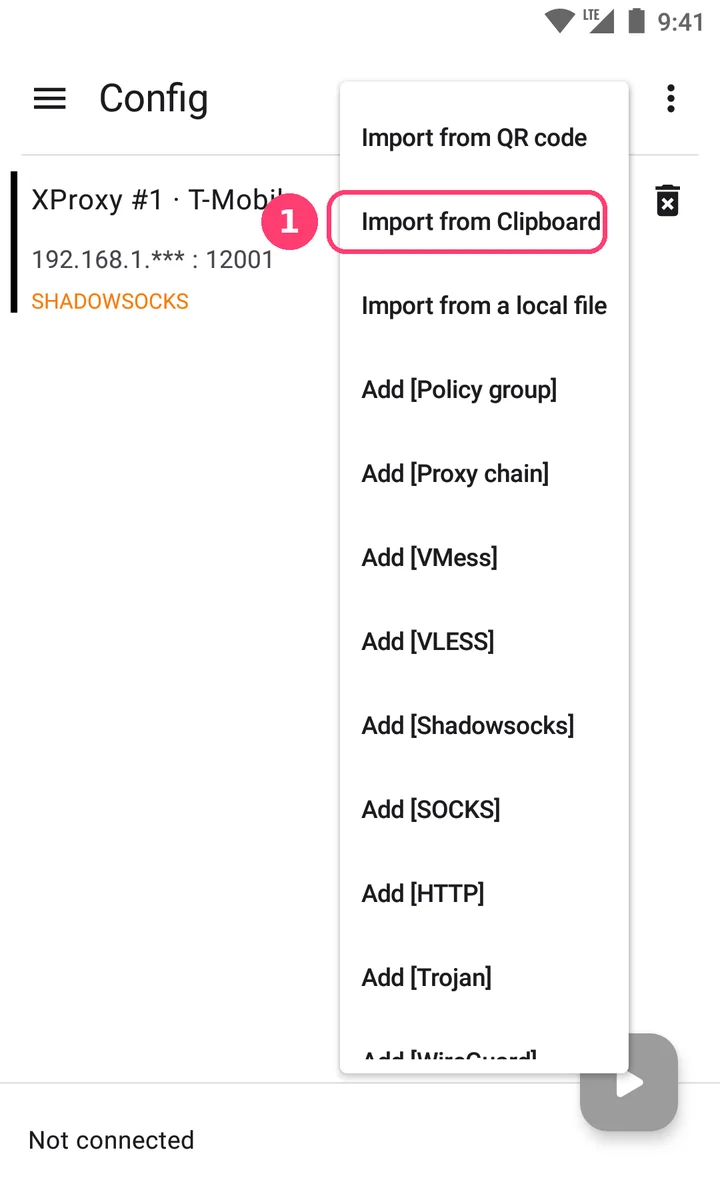
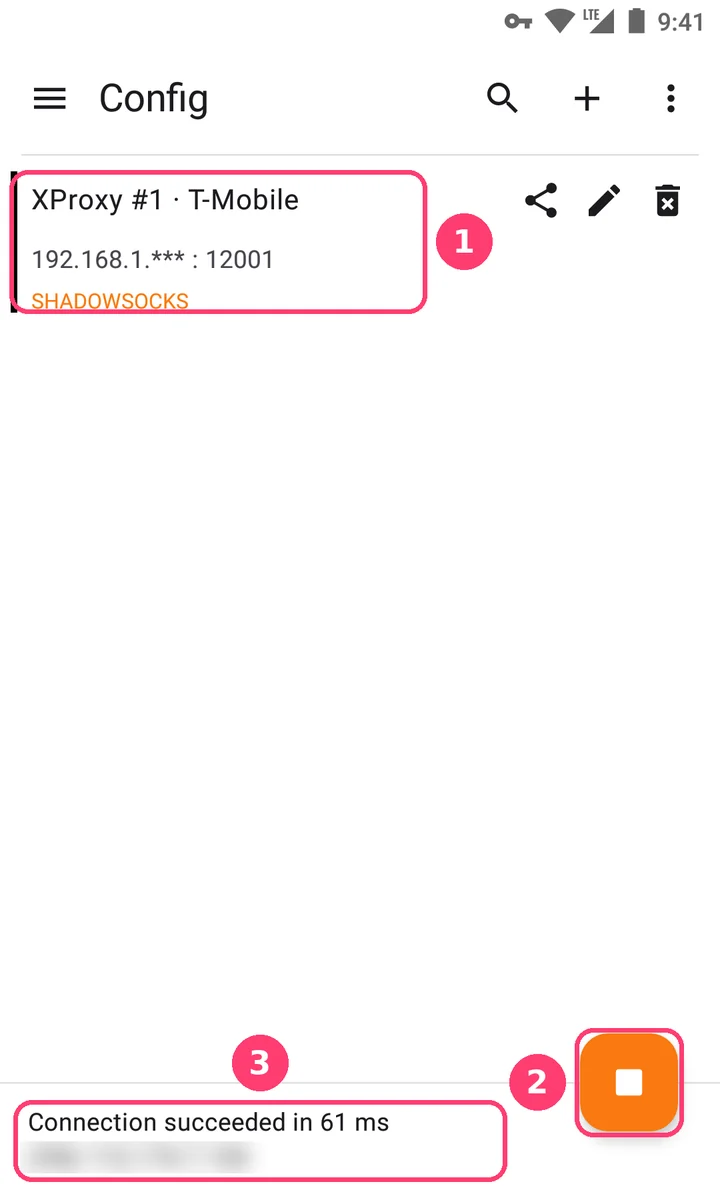
- Tap the new server 1 (type SHADOWSOCKS), then the round button 2. Accept the VPN request. Tap Connected, tap to check connection 3: it shows Connection succeeded and the modem's mobile IP.
What is inside the link?
ss://[email protected]:12001#XProxy%20%231%20%C2%B7%20T-Mobile| Part | Meaning |
|---|---|
YWVz…YXNz | The cipher and the password, aes-256-gcm:YourProxyPass in base64. Treat the whole link like a password. |
51.79.12.34:12001 | Where to connect: the VPS, router or LAN address, plus the Shadowsocks port of the modem. |
#XProxy #1 · T-Mobile | The name the app shows: modem position and carrier. |
Who can use my Shadowsocks ports?
- Anyone who has the link. The password inside it is the only key, so share each link only with the person who should use it.
- All modems share the box's proxy password. With proxy login turned off the password is
user, which anyone can guess: turn proxy login on before you open the ports to the internet. - The IP whitelist and website rules also apply to Shadowsocks. Bandwidth limits do not.
- On the Selling Platform each Shadowsocks port gets its own password, so a customer's link opens only their port.
Troubleshooting
| Symptom | Fix |
|---|---|
| The Shadowsocks switch is locked | Your plan is not Premium or Business. Upgrade the subscription. |
| "Start port too high for Shadowsocks" | Shadowsocks uses Starting Port + 8000 and up. Lower the Starting Port so the ports stay below 65535. |
| No SS tab in the table | Click Save & restart after switching it on, wait for the restart, then refresh the page. |
| The app connects but nothing loads | The link points to an address the device cannot reach, for example a LAN link used on mobile data. Pick VPS or Router in Addresses and copy the link again. |
| It worked yesterday, now it fails | The proxy password or the cipher changed, and with it the link. Copy the new link into the app. |
| Calls or games fail, websites work | UDP is blocked on the way. With router forwarding, forward the UDP ports too, not only TCP. |
FAQ
Shadowsocks or VLESS?
Both are encrypted. VLESS (REALITY) hides better: it looks like a visit to a big website, so strict networks leave it alone. Shadowsocks is simpler and supported by more apps and routers. Use VLESS where proxies get blocked, Shadowsocks everywhere else.
Does IP rotation work with Shadowsocks?
Yes. Port 12001 exits through modem #1, so rotating modem #1 (any rotation method) changes the IP for its Shadowsocks users too. Open connections drop for a moment while the modem reconnects.
Does it carry UDP?
Yes, on the same port as TCP. Apps that support it send UDP (calls, games, QUIC) through it, so you avoid the UDP limits of plain SOCKS5.
What next?
Hide the proxy better, or compare all the protocols.