

XProxy REST API: Rotate IP, Status & Proxy List
The XProxy REST API lets your own code list your mobile proxies, rotate their IPs, read their status and reboot modems with plain HTTP calls. Call the address of your box, add your dashboard login where it is needed, and you are done.
You need: the Basic plan or higher (Pricing; the Free plan has no IP rotation) and the address of your box. From outside your network, also your dashboard username and password.
In short
The address of your box, for example http://192.168.1.100. There is no separate API server.
Calls use your dashboard username and password (HTTP Basic). The rotate and status calls need no login unless you switch Force API Auth on.
info_list lists the modems, rotate_ip gets a new IP, status tells you when it is ready.
What is the base URL of the XProxy API?
The base URL is the address of your XProxy box, with the dashboard port if it is not 80:
| Where you call from | Base URL |
|---|---|
| Your local network | http://192.168.1.100 (the address of the box) |
| Another dashboard port | http://192.168.1.100:8080 (see Secure the dashboard) |
| The internet | http://myproxy.duckdns.org, your public address, or the VPS address. Reach the box with NAT Forwarding, VPS Forwarding or Tailscale. |
Add https:// only if your domain serves HTTPS. You can set a separate domain for links and API calls in Proxy Settings → Address.
How do I log in to the REST API?
There is no separate API key. A call that needs a login uses your dashboard username and password as HTTP Basic authentication, the same login you set in Secure the dashboard.
| Call | Login |
|---|---|
Rotate, status and reboot: /api/v1/rotate_ip/…, /api/v1/status/…, /api/v1/reboot/…, and the older /reset, /status links | None, until you switch Force API Auth on. Then HTTP Basic. |
Lists and everything else: /api/v1/info_list, /api/v1/proxy_list/…, /proxy_list, /reset_all, /reset_by_port, /status_by_port | HTTP Basic, from outside your local network. |
| A device on your local network, a whitelisted IP, or a Tailscale device (if allowed) | No login. Force LAN Auth and Force API Auth change that. |
| A customer proxy with its own token (Business plan) | The token in the link. See How to use the Selling Platform. |
Is there an API token?
The panel itself logs in with POST /v2/auth/login. It answers with a token that is only your username and password written in Base64, so keep it as secret as the password. Your scripts can send the same login with HTTP Basic on every call.
# optional: check a login (answer: status true and a token)
curl -X POST 'http://192.168.1.100/v2/auth/login' \
  --header 'Content-Type: application/json' \
  --data '{"username": "admin", "password": "YOUR_PASSWORD"}'
Where is the API in the panel?
Open API Reference in the sidebar. It links the full documentation at apidocs.xproxy.io and lists the three calls most people start with.
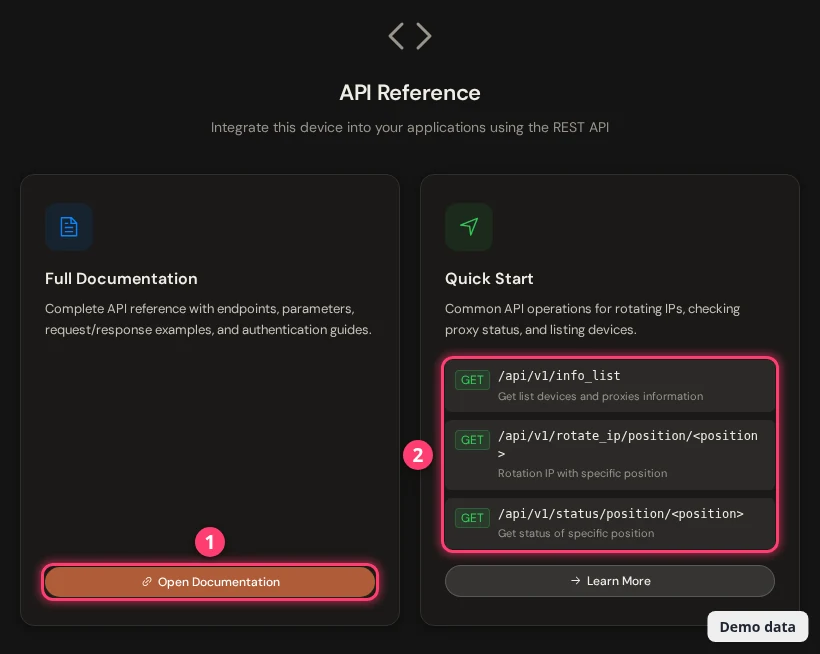
info_list, rotate_ip/position, status/position.Which endpoints can I call?
All calls are GET unless noted. <position> is the number of the modem (1 = first modem). <proxy> is host:port of its proxy.
| Endpoint | What it does | Login needed? |
|---|---|---|
/api/v1/info_list?page=&limit= | Lists the modems: ports, public IP, last rotation, device info. Answer: data and total. | Yes |
/api/v1/proxy_list/<type> | Plain text, one proxy per line. Types: proxy, socks5, proxy_ipv6, socks5_ipv6, vless, vless_ipv6, ss. | Yes |
/api/v1/rotate_ip/position/<position> | Gets a new IP for that modem. | No* |
/api/v1/rotate_ip/proxy/<proxy> | The same, by proxy. | No* |
/api/v1/status/position/<position>/api/v1/status/proxy/<proxy> | Public IP and state of the modem. | No* |
/api/v1/reboot/position/<position>/api/v1/reboot/proxy/<proxy> | Reboots the modem. | No* |
/reset?proxy=<proxy>, /status?proxy=<proxy> | The older rotate and status links. The panel's LINK button copies one. | No* |
/reset_all | Rotates every modem. | Yes |
POST /reset_by_port with {"port": 4001} | Rotates the modem of that proxy port. | Yes |
/status_by_port?port=4001 | Status by proxy port. | Yes |
Yes = the dashboard login, from outside your local network. No* = no login until Force API Auth is on. The full list, with every parameter, is in the API documentation.
How do I list my proxies with the API?
# all modems, first page of 20
curl -u admin:YOUR_PASSWORD 'http://192.168.1.100/api/v1/info_list?page=1&limit=20'

# every modem at once (leave page and limit out)
curl -u admin:YOUR_PASSWORD 'http://192.168.1.100/api/v1/info_list'
From your own local network, or from a whitelisted IP, you can leave out -u.
The answer, shortened:
{
  "data": [
    {
      "position": 1,
      "host": "192.168.1.100",
      "proxy_port": 4001,
      "socks5_port": 5001,
      "public_ip": "203.0.113.25",
      "public_ip_ipv6": null,
      "device_manufacture": "XProxy-Hilink",
      "device_rebooting": false,
      "device_resetting": false
    }
  ],
  "total": 1
}
Other fields in each item: proxy_port_v6, socks5_port_ipv6, vless_port, vless_port_v6, ss_port, ss_port_v6, last_updated_ip, device_imei, device_number, device_ip and device_extra_info.
How do I rotate the IP with the API?
Call rotate_ip, then read status until the modem is MODEM_READY with a new IP. The same calls, the timer and the rotation link are in How to change the IP.
# by position (1 = first modem)
curl 'http://192.168.1.100/api/v1/rotate_ip/position/1'

# or by proxy (host:port)
curl 'http://192.168.1.100/api/v1/rotate_ip/proxy/192.168.1.100:4001'

# the box answers at once:
# {"status": true, "msg": "command_sent"}

# check on the new IP a few seconds later
curl 'http://192.168.1.100/api/v1/status/position/1'
# {"status": true, "public_ip": "203.0.113.77", "public_ip_v6": null,
#  "last_public_ip": "203.0.113.25", "msg": "MODEM_READY"}
No login is needed unless Force API Auth is on. Then add -u admin:YOUR_PASSWORD.
How do I get a plain list of proxies for my tool?
# plain text, one host:port per line
curl -u admin:YOUR_PASSWORD 'http://192.168.1.100/api/v1/proxy_list/proxy'
curl -u admin:YOUR_PASSWORD 'http://192.168.1.100/api/v1/proxy_list/socks5'

# 192.168.1.100:4001
# 192.168.1.100:4002
Other types: proxy_ipv6, socks5_ipv6, vless, vless_ipv6 and ss. VLESS and Shadowsocks give share links and need the Premium plan or higher.
How do I make the API ask for a login?
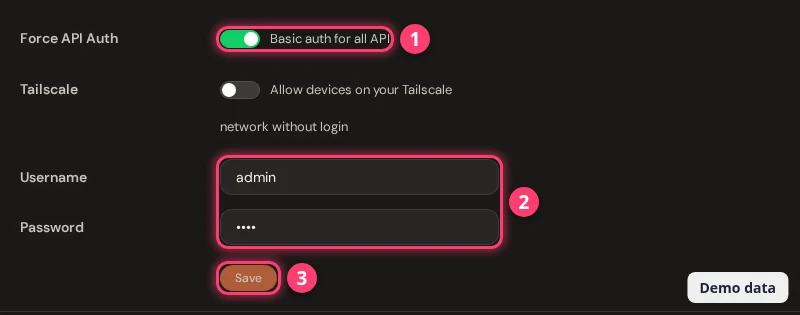
Open General Settings → System Setting → Security, switch Force API Auth on ① and save ③. Save a username and a password first ②, so your calls have a login to send.
What do the answers mean?
| You get | Meaning |
|---|---|
{"status": true, "msg": "command_sent"} | The rotation started. The new IP comes a few seconds later. |
need_upgrade | Your plan has no IP rotation. See Manage your subscription. |
modem_resetting or MODEM_RESETTING | A rotation is already running on that modem. |
MODEM_STOPPED | The modem is stopped, so it cannot rotate. |
slot_not_found, MODEM_NOT_FOUND | No modem on that port or position. |
invalid_format_proxy | The proxy must look like host:port. |
MODEM_DISCONNECTED | The modem is off or unplugged. |
COLLISION_IP | Same IP as before the rotation (only when IP unchanged detect is on). |
HTTP 401, {"message": "Unauthorized…"} | The call needs the dashboard login. Add it, or call from a whitelisted IP. |
| HTTP 403, Access Denied | Domain Only is on. Call with a domain name, not an IP address. |
FAQ
Where do I get an XProxy API key?
There is no API key. Use your dashboard username and password as HTTP Basic login, or call without a login from your local network. For rotate and status links, a login is only needed after you switch Force API Auth on.
How do I rotate a mobile proxy IP from code?
Send GET /api/v1/rotate_ip/position/1 to your box. It answers command_sent at once. Then call /api/v1/status/position/1 until msg is MODEM_READY and public_ip has changed.
How often can I rotate?
A rotation is refused while another one runs on the same modem (modem_resetting). You can also set the shortest time between two rotations of a port in Rotation Settings.
Can I call the API from outside my network?
Yes, once you can reach the box from outside. Use a domain or public address as the base URL and add your dashboard login. Switch Force API Auth on, so the rotate links ask for it too.
Can my customers use the API?
They get their own link with a token for their proxy (Business plan), so they never need your dashboard login. See How to use the Selling Platform.
What next?
Rotate on a timer, protect your calls, or plug the proxies into a tool.